

DEBCOR Product · Solution ID 2002723
Pricing is strategic. Make it low friction to manage.
Master pricing is one of the most strategic levers in the business — and the slowest thing in SAP to maintain. DEBCOR's Dynamic Pricing Load Tool puts it back in business hands. Excel-native templates, dynamic record selection, upload simulation, and line-level error logging. The result: faster, more flexible pricing changes and consistent data quality across the process.
Overview
Three reasons pricing teams reach for it.
Built for the pricing analyst, the master-data lead, and the SAP team that keeps them unblocked. Self-service for the business, predictability for IT.
01
Cut pricing data prep time with automated Excel templates
Tailor fields to the exact pricing condition type selected. Quickly prepare accurate data, validate entries, and upload changes with confidence — the structured workflow minimises errors and speeds up maintenance.
02
Speed up pricing cycles by giving business teams direct control
Let your business teams manage SAP ERP pricing conditions without IT. They download existing data, update or create entries in Excel, and upload seamlessly — reducing workflow complexity and accelerating pricing cycles.
03
Improve accuracy with built-in error tracking
A comprehensive error log checks every upload for completeness and correctness during simulation or production loads. Clear explanations let users fix issues fast and resubmit with confidence.
What's Included
Everything to run pricing maintenance without IT.
- Generate Excel load templates tailored to each SAP ERP pricing condition type
- Download existing records with dynamic selection by sales org, customer, material, validity dates
- Create, update, and upload pricing condition records in bulk directly from Excel
- Validate changes with upload simulation before posting — no risk to live data
- Line-level error logging that pinpoints exactly which records failed and why
- Install on your own SAP system: S/4HANA Private Edition, SAP ERP, and SAP Build
How it works
Three steps. Built for self-service.
From selecting the right condition records through validating uploads against live SAP — the whole flow is built around catching issues before they touch production data.
01
Choose & download
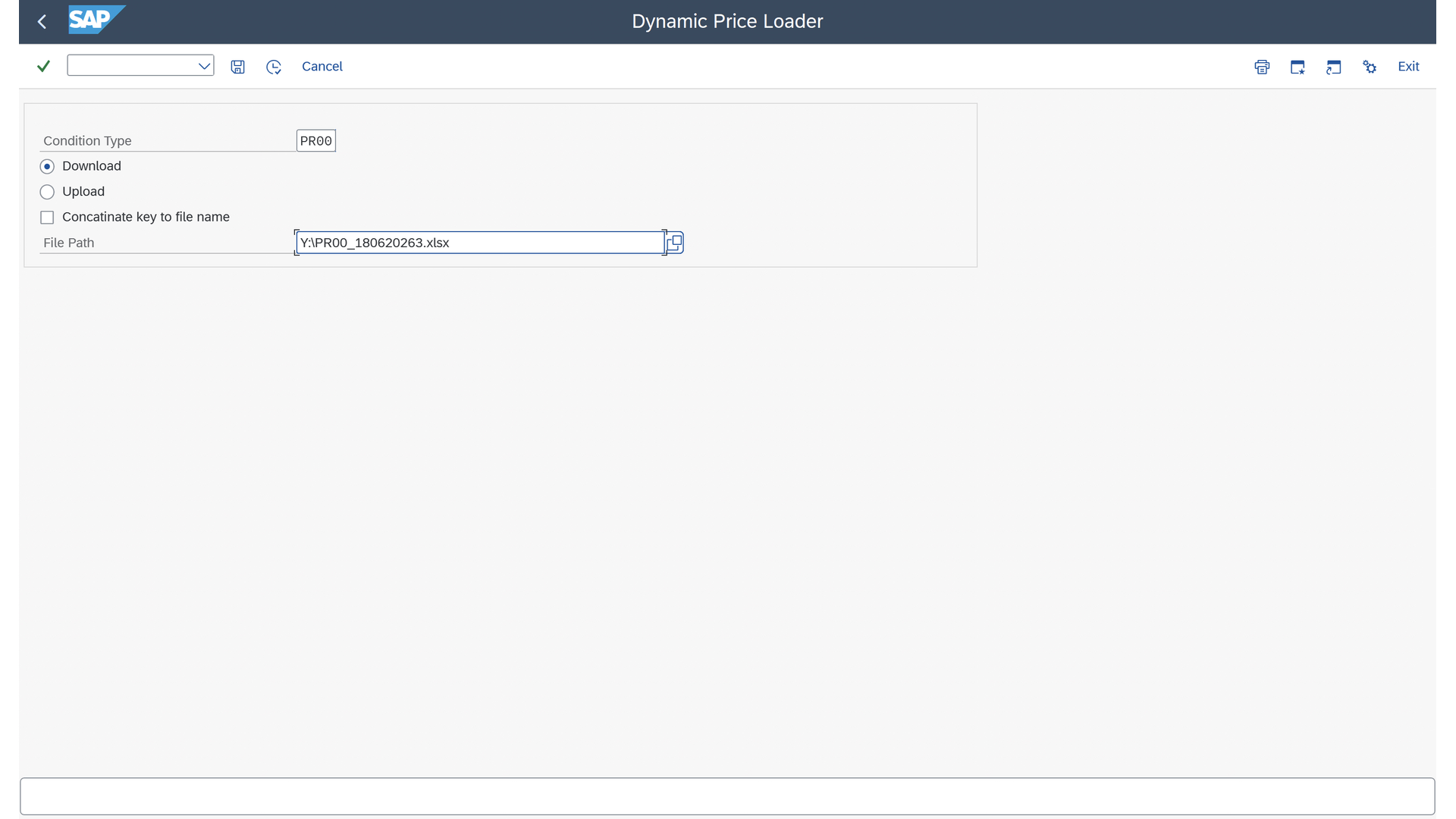
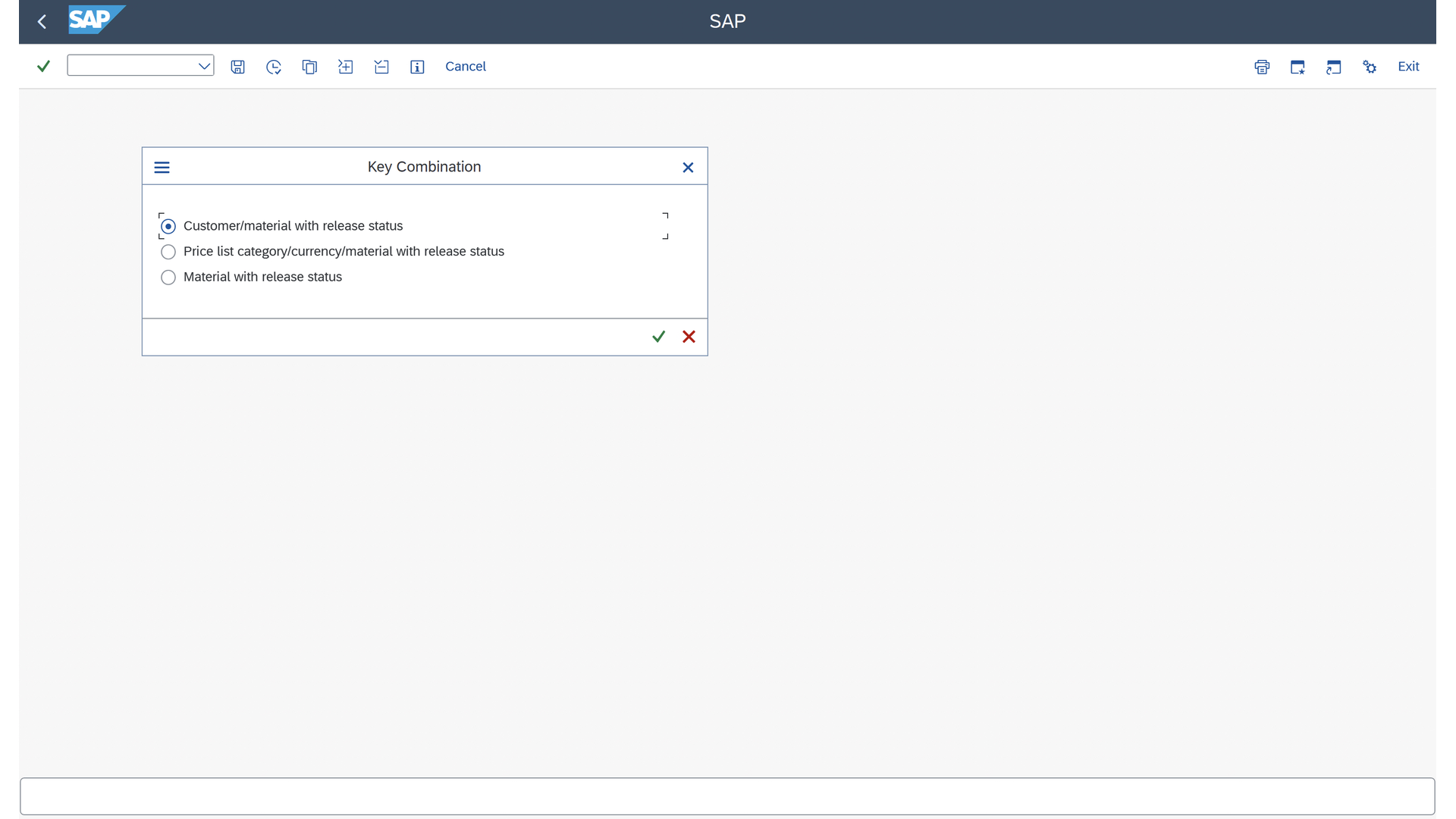
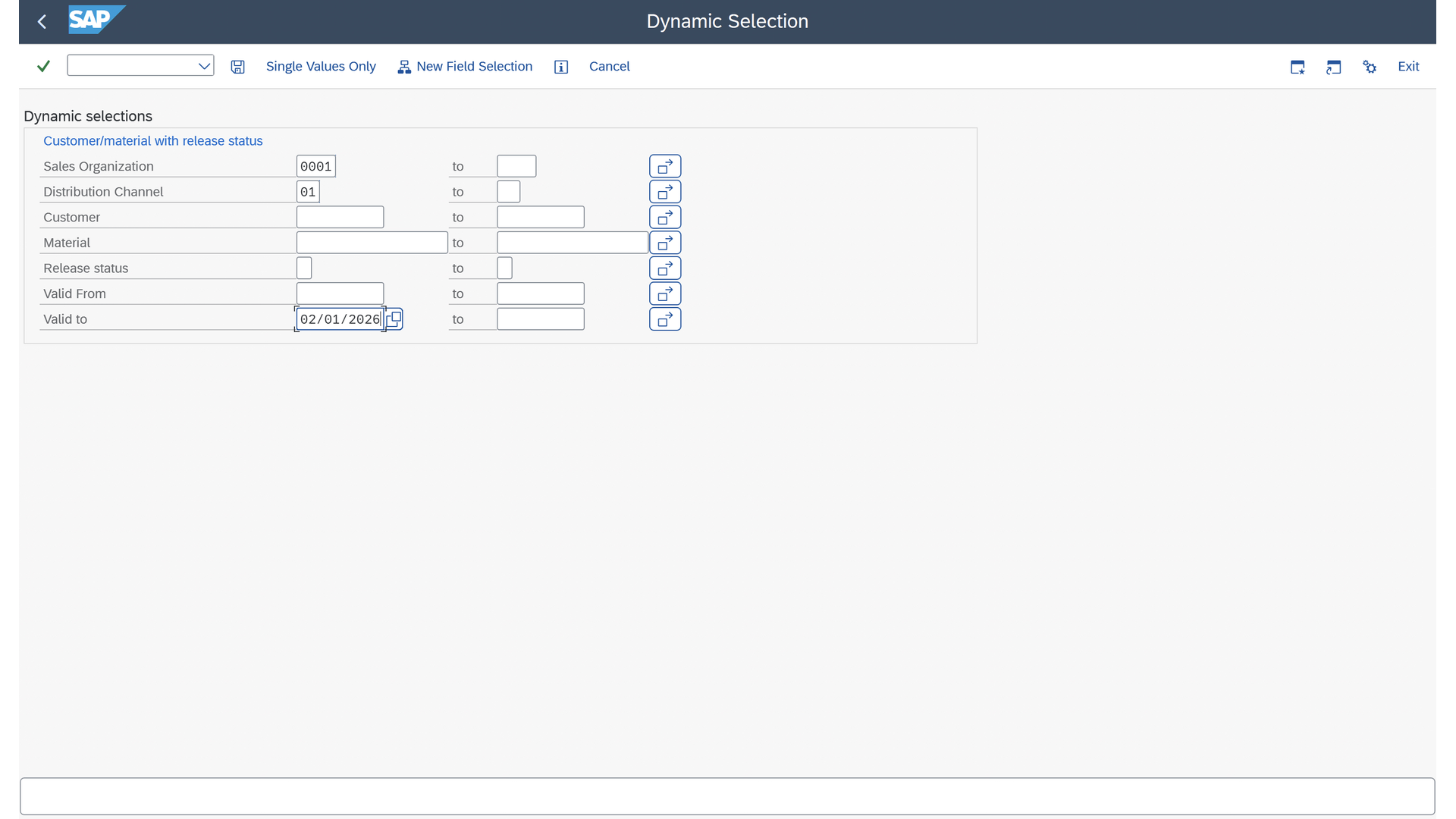
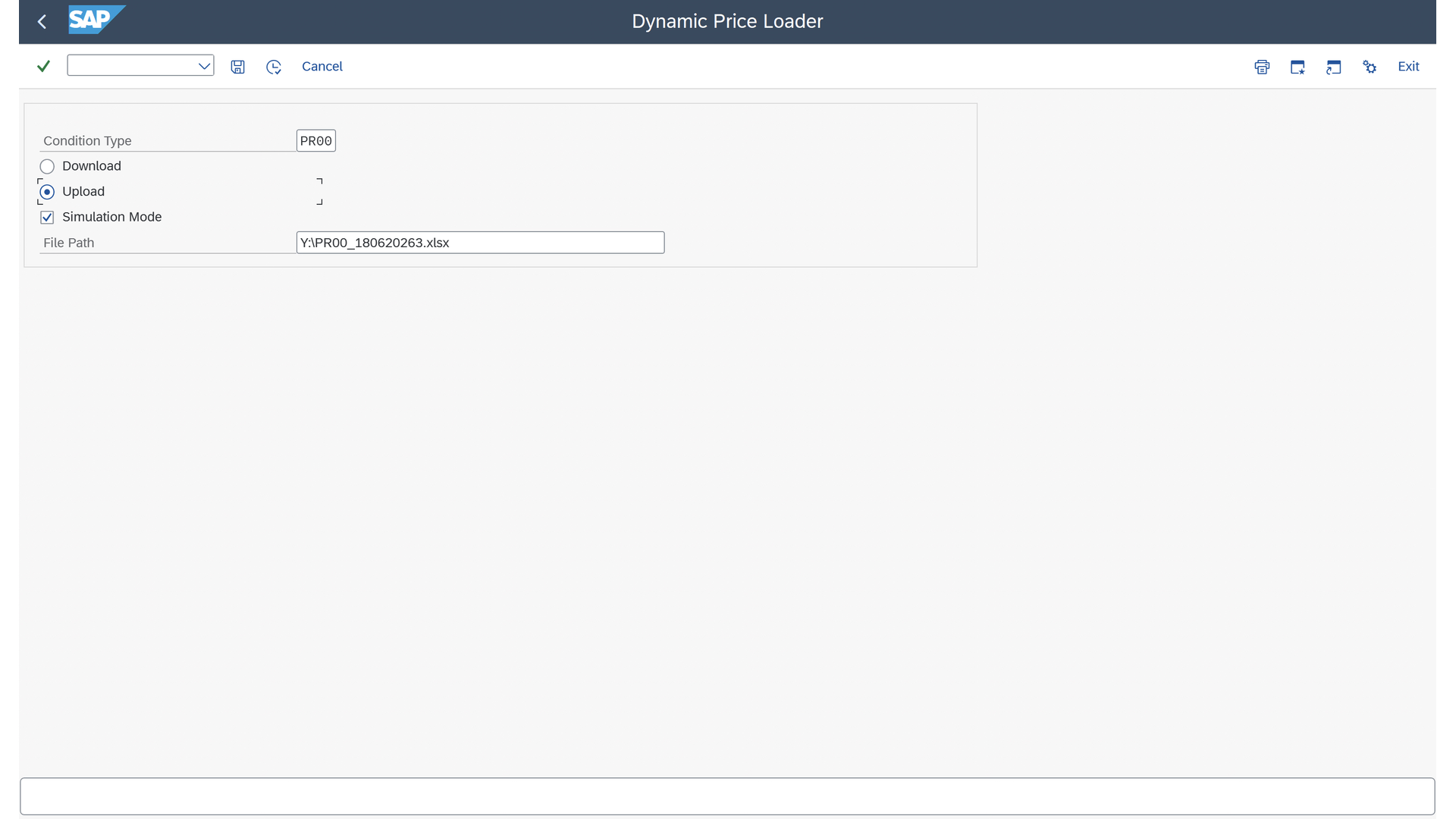
Pick the pricing condition type. The Key Combination dialog selects the access sequence. Dynamic Selection filters down to exactly the records you want. Templates generate automatically.
02
Edit in Excel
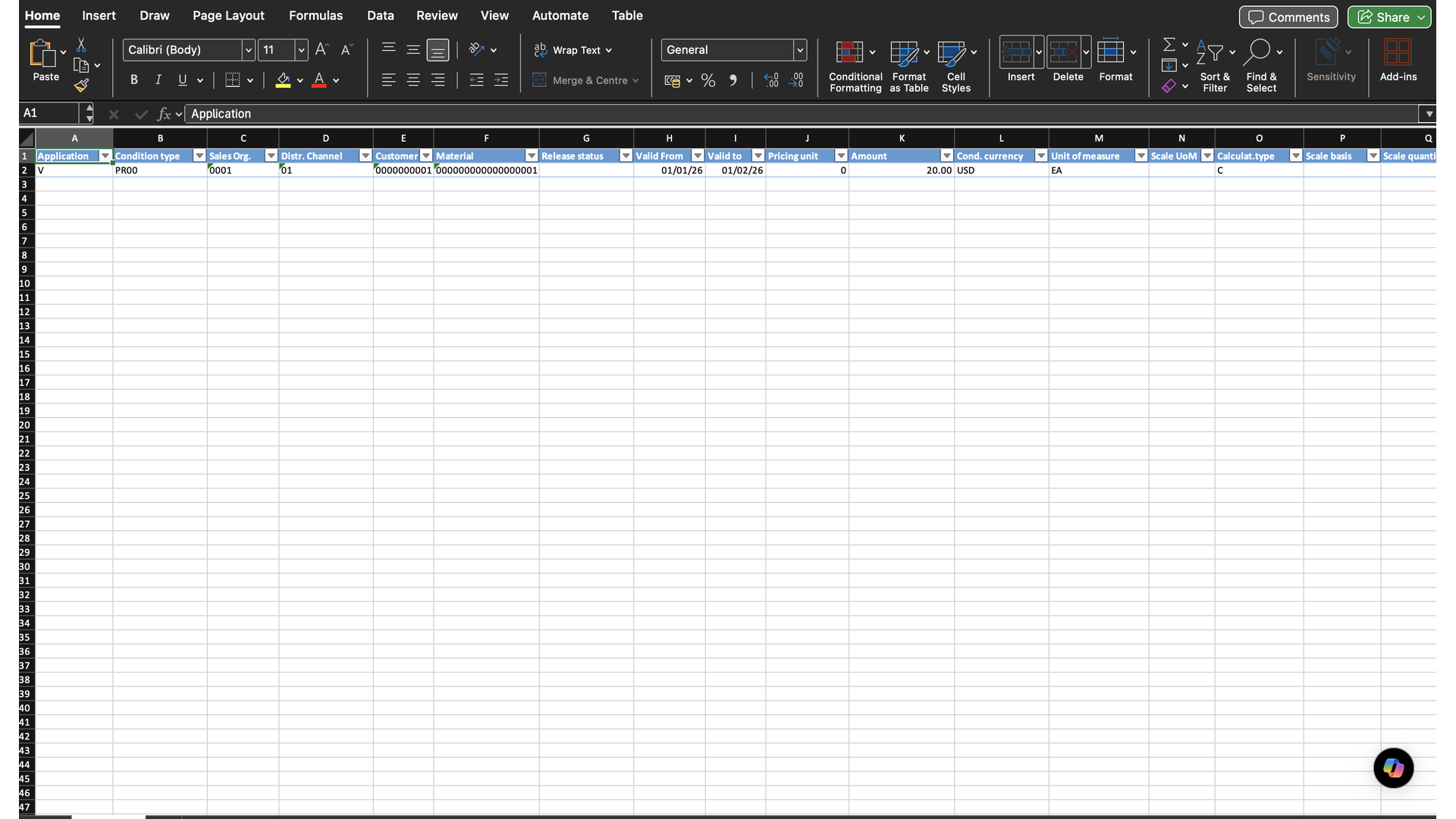
The generated template carries the right fields for your condition type — condition type, sales org, customer, material, valid-from/valid-to, amount, unit. Business users edit; no IT involvement.
03
Simulate, then post
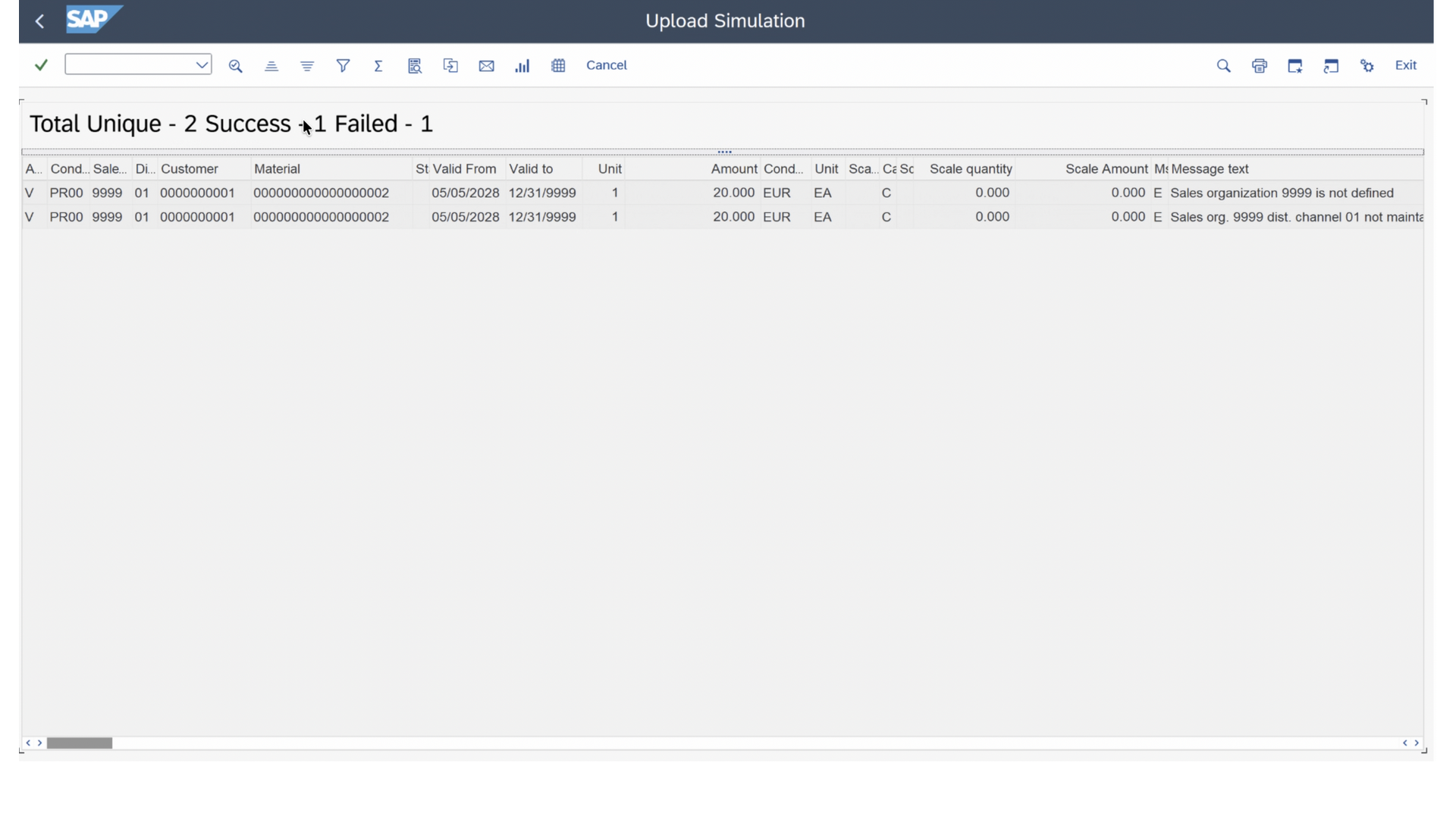
Switch to Upload + Simulation Mode. Upload the edited file. The tool validates every line against SAP and reports success / failure with line-level messages. Fix what's flagged, then post for real.
See it in action
The full workflow, end to end. 6 minutes.
Template generation from SAP pricing configuration, dynamic selection by sales org / customer / material / validity dates, Excel edits, upload simulation, and the line-level success/error log — all in one walkthrough.
Key Features
The features pricing teams notice on day one.
Ready-to-use Excel templates, tailored to your condition type
Clean Excel load templates generated directly from your SAP ERP pricing configuration. Each template carries the required fields, formats, and validations for the selected condition type — no guesswork.
Catch upload errors before they reach production
Detailed, line-level error logging on every upload. The tool highlights exactly what went wrong and why, so users fix problems fast. Clear, actionable validation improves accuracy, reduces rework, and supports reliable pricing updates.
Target the exact pricing records to download and update
Pull exactly the pricing records you need using dynamic selection by sales organization, distribution channel, customer, material, and validity dates. Targeted filtering keeps each download focused — no sifting through noise.
How it's different
Why this beats standard SAP for pricing maintenance.
Standard SAP has an Excel upload-and-download for pricing on modern public-cloud S/4HANA. Here's what this tool brings on top — and where it reaches that the standard app doesn't.
Reaches SAP ERP and S/4HANA Private Edition
Most native Excel upload functionality is public-cloud-only. This tool installs on SAP ERP, S/4HANA Private Edition, and SAP Build — the systems most enterprises actually run.
Broader condition types, not just sales pricing
Configured to your pricing access sequence, across condition types — not limited to sales-pricing scenarios that ship with the native app.
Upload simulation before posting
Validates every line against SAP without touching live data — so pricing teams find errors in a dry run, not a production incident.
Line-level error logging
Every failed row reports exactly which validation it broke, so the user fixes the actual problem instead of resubmitting blind.
Technical Information
Everything an SAP team needs to evaluate.
Solution Type
Extensions and Add-ons
Category
Sales
Industry
Cross-Industry · Agribusiness · Oil, Gas & Energy · Consumer Products · Retail
Works With
SAP S/4HANA Cloud Private Edition · SAP ERP · SAP Build
Resources
Take it back to the team.
Dynamic Pricing Tool — Slide Deck
Walks through the end-to-end process: template generation, Excel-based edits, simulation, and final upload. Built for stakeholders.
Open the deck →PDF · Process FlowProcess Flow Reference
Visual process flow showing how pricing data is generated, validated, and uploaded — from template creation through final post into SAP.
Open the process flow →Video · VimeoiFIT CIO on partnering with DEBCOR
The CIO of iFIT on why DEBCOR's depth of knowledge and white-glove service are a game-changer — the customer-success view.
Watch the video →Video · VimeoBusiness outcome from the pricing tool
A short video walking business stakeholders through the value of using the tool — built for buyer conversations.
Watch the video →Ready to put pricing maintenance back with the business?
Tell us which SAP system you run and roughly how many condition types your team maintains. We'll scope the install and walk your team through a working session.
Solution ID 2002723 · Standalone Tool Edition · Live on the SAP Store. Pricing and edition details on the SAP Store listing.